
When a client accepts a quote, Rebill can automatically convert it to an invoice and optionally send it right away. This eliminates the manual step of converting quotes and speeds up your billing workflow.
Setting up auto-convert
- 1
Go to Settings > Automation
Click Automation under Settings in the sidebar, then click Quote auto-convert in the section rail.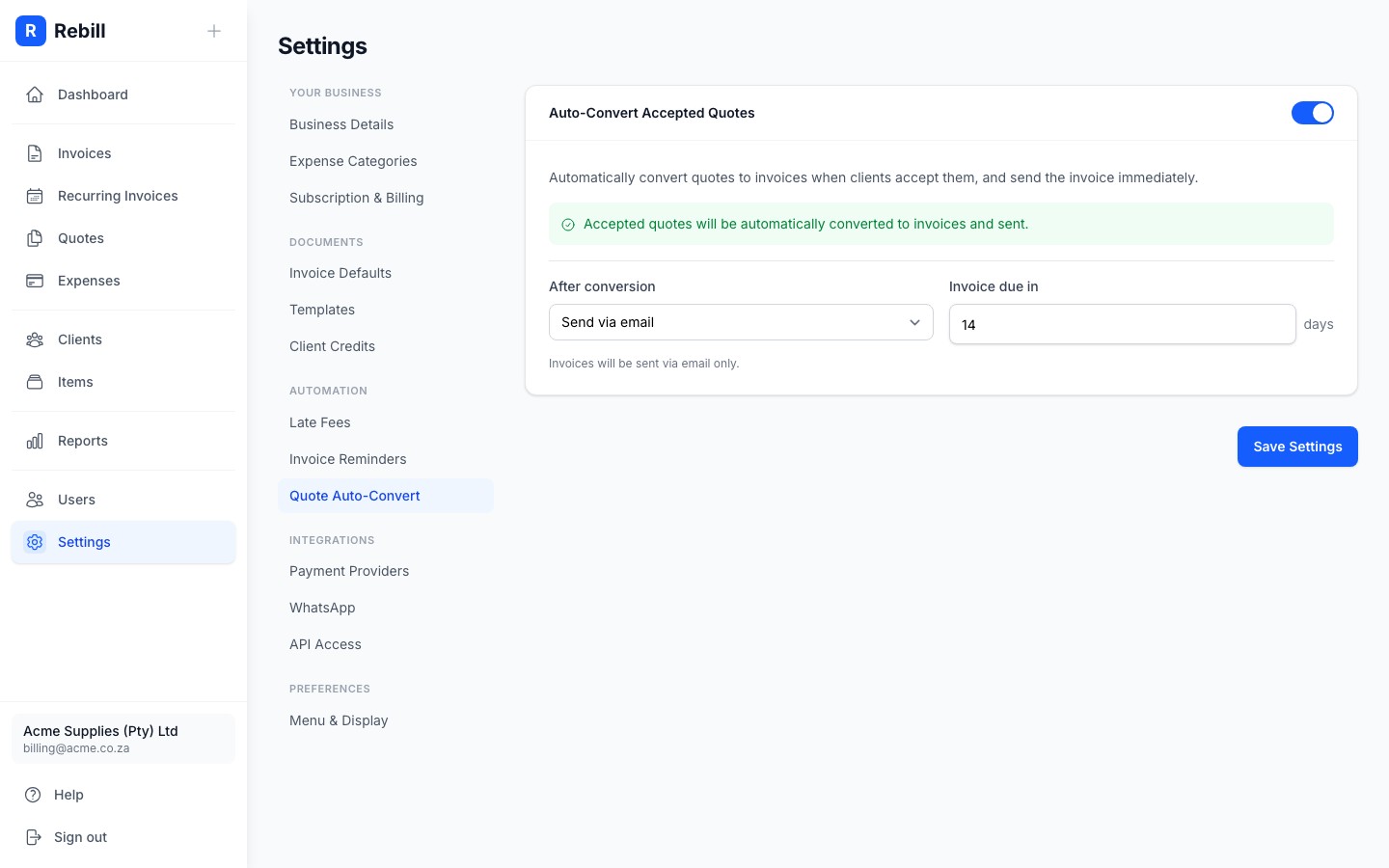
- 2
Enable auto-convert
Toggle the switch at the top of the card to enable auto-conversion. When enabled, accepted quotes will be automatically converted to invoices. - 3
Choose what happens after conversion
Select one of three options:- Keep as draft: the invoice is created but not sent. You can review and send it manually.
- Send via email: the invoice is created and immediately emailed to the client.
- Send via email and WhatsApp: the invoice is sent both by email and WhatsApp (uses one WhatsApp credit).
- 4
Set the payment due date
Enter the number of days after the invoice date that payment is due. The default is 14 days. - 5
Save your changes
A save bar appears at the bottom of the page once you change something. Click Save, or press Cmd+S (Ctrl+S on Windows).
Premium feature
Quote auto-convert is available for Premium subscribers only. Free plan accounts can still manually convert quotes to invoices from the quote detail page.